Microsoft – Error “memory integrity is off” from Windows
Problem
A Windows user encounters an error message “Memory integrity error" inside the Windows settings app. Full error text below:

Memory integrity
Memory integrity is off. Your device may be vulnerable
Applies to
- Windows 11
Resolution
The first two methods can be provided to customers, method three should not be provided to end users.
Method 1 - Reset Windows Security
1. Right
click Start button and select Install apps.
2. Scroll
down to System Components and click this option.
3. On
the next window scroll down to Installed Apps.
4. Scroll
down to Windows Security and click the three dot menu, then select Advanced Options.
5. Then
scroll down to Reset button and click it You should briefly see a progress bar and a tick symbol to indicate reset
has been carried out.
6. Restart
Windows and check if the error message has disappeared.
Microsoft forums post link
Method 2 - Enable or Disable Core Isolation and Memory Integrity using Windows Settings App
Right click Start menu and search Windows Defender
Security Centre and open it
Then click Device Security option.
Under Device Security check if Core Isolation under
Virtualization is enabled on your PC.
Click on Core isolation details link.
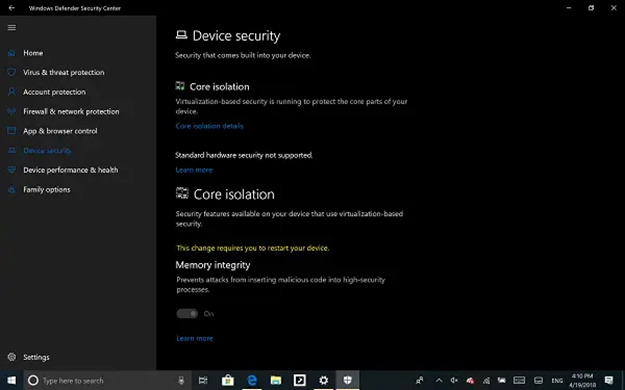
Then click the toggle to enable Memory Integrity.
Restart the computer if prompted to do so.
Restart the computer if prompted to do so.
Method 3 – Using Windows registry
If the above steps do not help use these registry
modifications instead.

Note
Only provide this to technicians to carry out, please do
not give this to end users.
1. Open
Regedit.exe.
2. Navigate
to Scenarios in: HKEY_LOCAL_MACHINE.
3. Right-click
on: Scenarios > New > Key.
4. Name
it as: HypervisorEnforcedCodeIntegrity.
5. Right-click
on it > New > DWORD (32-bit) Value.
6. Name
it as: Enabled
Enable/Disable core isolation article
Related Articles
Microsoft - Warning error Windows Speech Recognition support ending
Problem A Windows user encounters an error that pops up on their system advising the customer that support for Windows Speech Recognition is ending. Applies to Windows 11 Resolution Microsoft on the link below have announced that Windows Speech ...Microsoft – Disable Windows S mode
Problem A user has a laptop that is running in Windows S mode and wishes to use non-Microsoft Store apps. Applies to Windows 11 Resolution Some laptops may come supplied wit Windows running in S mode. This is a special secure mode where only ...Microsoft - Starting Windows Narrator
Problem A JAWS or ZoomText customer encounters a problem where their machine starts without their accessibility product and need speech access in order to aid support to remote into their computer. Applies to Windows 10/11 Resolution Use one of the ...Laptop & Desktop - Recurring blue screen “Memory Management” error
Problem A customer receives recurring BSOD errors, the error code is given as “Memory Management” when displayed. Resolution This kind of blue screen suggests there may be problems with the RAM. Below are some ways to test this but one should be ...Microsoft - Starting Windows Narrator
Problem A screen reader user encounters a problem where they have lost access their product and there is no speech, they need to enable some speech in order to troubelshoot or request remote assistance. Applies to Windows 10/11 Resolution Windows ...